Configuration
First configure the external authentication server
aaa radius-server "freeradius" host IP.AD.DR.ES hash-key "HASHKEY" hash-salt "HASHSALT" retransmit 3 timeout 2 auth-port 1812 acct-port 1813 vrf-name default
aaa profile "CPAUTH"
aaa profile "CPAUTH" device-authentication captive-portal "freeradius"
aaa profile "CPAUTH" accounting captive-portal "freeradius"
Next create the captive portal profile
captive-portal-profile cp-profile
captive-portal-profile cp-profile aaa-profile CPAUTH
captive-portal-profile cp-profile authentication-pass profile-change enable
Finally configure the port port profiles. Make sure redirect-port-bounce is enabled on the port template otherwise the device won’t get an ip in the new network/vlan.
unp profile "HOME"
unp profile "HOME" map vlan 100
unp profile "CPORTAL" captive-portal-authentication captive-portal-profile "cp-profile"
unp profile "CPORTAL" map vlan 999
unp port-template PORTTEMPLATE redirect-port-bounce direction both default-profile "CPORTAL" classification ap-mode admin-state enable
unp port 1/1/1 port-type bridge
unp port 1/1/1 port-template PORTTEMPLATE
FreeRadius Configuration
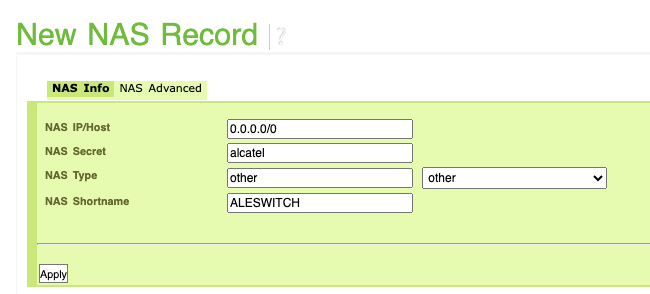
Configure the switches as NAS client in FreeRadius or allow all devices to authenticate
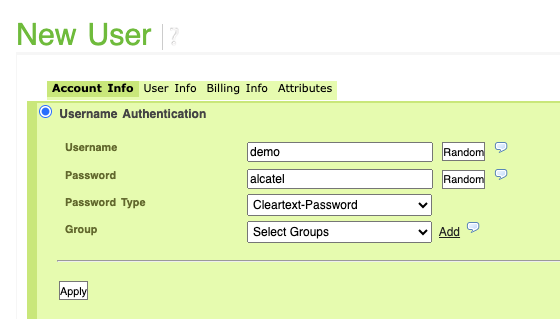
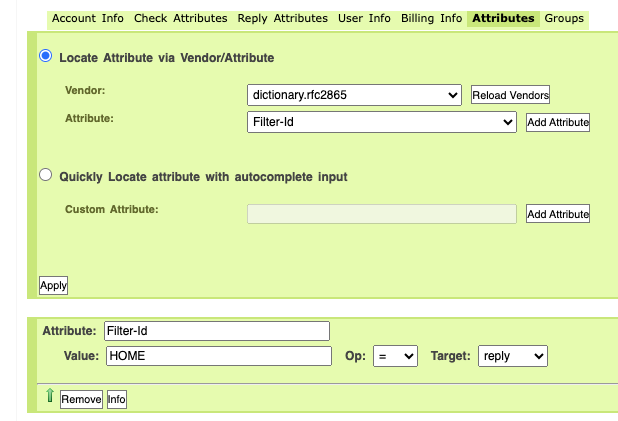
Create a new user and set a Filter Id Attribute to change the UserProfile when authenticated
Functional working
After configuring, first the device will be put in the CPORTAL profile and a Captive Portal will be displayed.
# show unp user details port 1/1/1
Port: 1/1/1
    MAC-Address: 7c:c2:c6:1c:76:73
      SAP                             = -,
      Service ID                      = -,
      VNID                            = -,
      VPNID                           = -,
      ISID                            = -,
      Access Timestamp                = 10/13/2023 12:04:03,
      User Name                       = 7c:c2:c6:1c:76:73,
      IP-Address                      = 172.99.9.231,
      Vlan                            = 999,
      Authentication Type             = -,
      Authentication Status           = -,
      Authentication Failure Reason   = -,
      Authentication Retry Count      = 0,
      Authentication Server IP Used   = -,
      Authentication Server Used      = -,
      Server Reply-Message            = -,
      Profile                         = CPORTAL,
      Profile Source                  = No Auth - Default UNP,
      Profile From Auth Server        = -,
      Session Timeout                 = -,
      Classification Profile Rule     = -,
      Role                            = built-in,
      Role Source                     = Initial CP,
      User Role Rule                  = -,
      Restricted Access               = Yes,
      Location Policy Status          = -,
      Time Policy Status              = -,
      QMR Status                      = Passed,
      Redirect Url                    = -,
      SIP Call Type                   = Not in a call,
      SIP Media Type                  = None,
      Applications                    = None,
      Encap Value                     = -,
      Rule ID                         = 1,
After authenticating the radius server will return the attribute ‘Filter ID’ which contains the profile name. Due to port-bounce and profile change enabled the device will be put in this new profile and can access the network.
sh unp user details port 1/1/1
Port: 1/1/1
    MAC-Address: 7c:c2:c6:1c:76:73
      SAP                             = -,
      Service ID                      = -,
      VNID                            = -,
      VPNID                           = -,
      ISID                            = -,
      Access Timestamp                = 10/13/2023 12:04:32,
      User Name                       = test,
      IP-Address                      = 10.10.100.28,
      Vlan                            = 100,
      Authentication Type             = -,
      Authentication Status           = -,
      Authentication Failure Reason   = -,
      Authentication Retry Count      = 0,
      Authentication Server IP Used   = 10.10.1.181,
      Authentication Server Used      = freeradius,
      Server Reply-Message            = -,
      Profile                         = HOME,
      Profile Source                  = CP Auth Pass - Edge profile,
      Profile From Auth Server        = HOME,
      Session Timeout                 = 86400,
      Classification Profile Rule     = -,
      Role                            = -,
      Role Source                     = -,
      User Role Rule                  = -,
      Restricted Access               = No,
      Location Policy Status          = -,
      Time Policy Status              = -,
      QMR Status                      = Passed,
      Redirect Url                    = -,
      SIP Call Type                   = Not in a call,
      SIP Media Type                  = None,
      Applications                    = None,
      Encap Value                     = -,
      Rule ID                         = 1,
Troubleshooting
Global Captive Portal Configuration
# show captive-portal configuration

Captive Portal Global Configuration:

  Captive Portal Mode                   = Internal
  DHCP Parameters:
     DHCP Lease Time     = NA
     DHCP Renew Time     = NA
     DHCP Rebinding Time = NA
  Captive Portal IP address             = 10.123.0.1
  Captive Portal Redirect String        = captive-portal.com
  Captive Portal Success Redirect URL   =
  Captive Portal Proxy Server Port      = 8080
  Captive Portal Retry Count            = 3
  Captive Portal Global Auth Policy List=
  Captive Portal Page Customization     = Enable
  Captive Portal Profile Name           =
  Captive Portal Profile Change         = Disable
  Domain Specific Policy Lists:
            Domain              | Realm  |           Policy List          |           Profile Name         | Profile
                                |        |                                |                                | Change
--------------------------------|--------|--------------------------------|--------------------------------|---------
Captive Portal Profile configuration
# show captive-portal profile-name cp-profile configuration

Captive Portal Profile cp-profile Configuration:

  Captive Portal Mode                    = Internal
  Captive Portal AAA Profile Name        = CPAUTH
  Captive Portal Success Redirect URL    = https://al-enterprise.com
  Captive Portal Retry Count             = 3
  Captive Portal Global Auth Policy List =
  Captive Portal Profile Name            =
  Captive Portal Profile Change          = Enable
  Domain Specific Policy Lists:
            Domain              | Realm  |           Policy List          |          Profile Name          | Profile
                                |        |                                |                                | Change
--------------------------------|--------|--------------------------------|--------------------------------|---------
Check connected users
# show unp user
                                               User
Port    Username             Mac address       IP (V4/V6)                               Vlan Profile                          Type         Status
-------+--------------------+-----------------+----------------------------------------+----+--------------------------------+------------+-----------
1/1/1   test                 7c:c2:c6:1c:76:73 10.10.100.30                             100  HOME                             Bridge       Active

Total users : 1
Test authentication server
# aaa test-radius-server freeradius type authentication user test password test
Testing Radius Server <10.10.1.181/freeradius>
Access-Challenge from 10.10.1.181 Port 1812 Time: 15 ms
Access-Accept from 10.10.1.181 Port 1812 Time: 5 ms
Returned Attributes
    Filter-ID = HOME
    User Name = test